
This report provides you with a clear and concise overview of all your sales over a given period. It brings together the essential information you need to analyze your company's overall performance. The steps below will guide you through the process of easily generating this sales summary in the system. Click on Sales > Reports > Summary.
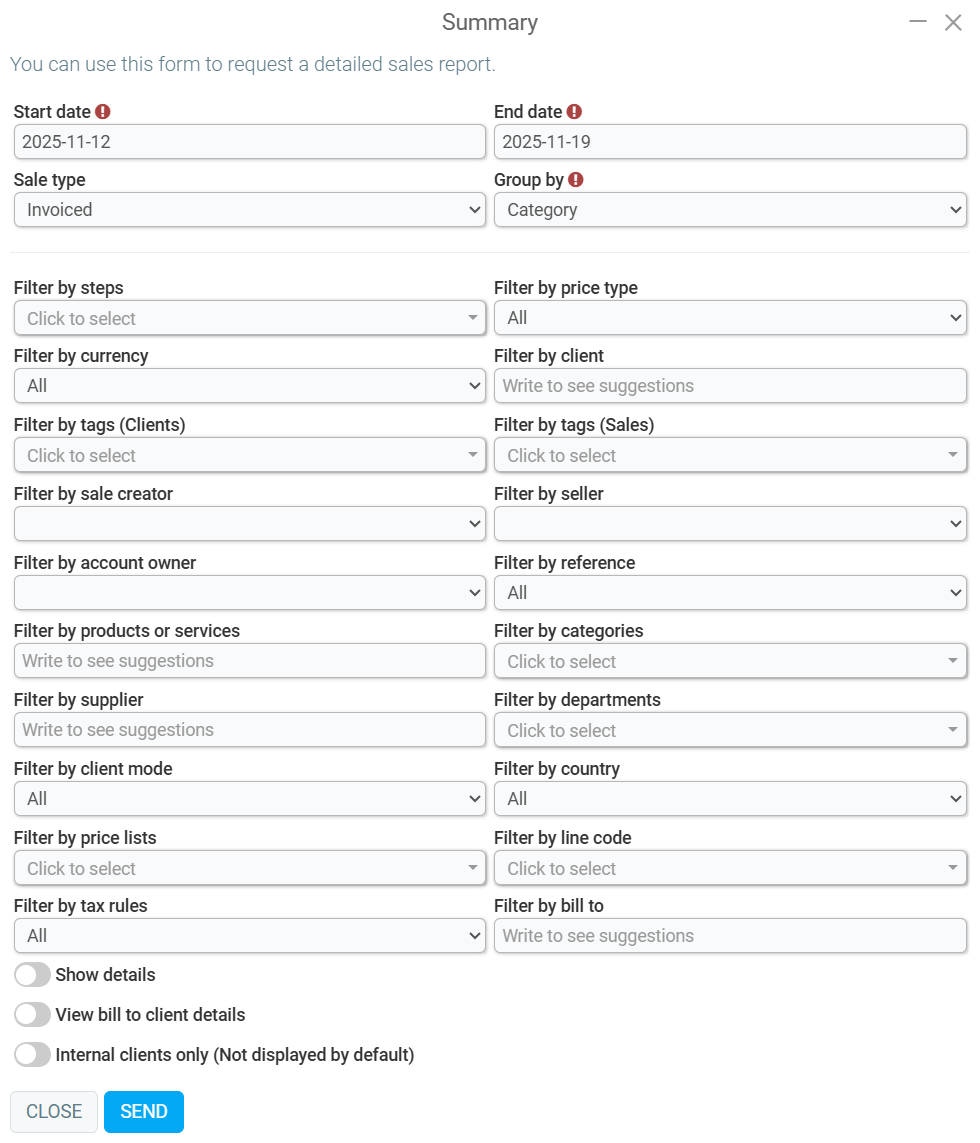
On the page titled Summary, you will find the following mandatory information:
- Start date
- End date
- Group by
Among the filter options, you will have the following:
- Sale type
- Filter by steps
- Filter by price type
- Filter by currency
- Filter by client
- Filter by tags (Clients)
- Filter by tags (Sales)
- Filter by sale creator
- Filter by seller
- Filter by account owner
- Filter by reference
- Filter by products or services
- Filter by categories
- Filter by supplier
- Filter by departments
- Filter by client mode
- Filter by country
- Filter by price lists
- Filter by line code
- Filter by tax rules
- Filter by bill to
Among the options to check or not, you will have the following:
- Show details
- View bill to client details
- Internal clients only (Not displayed by default)
After selecting the desired filter options, click Send.
The report will display the information according to the data and filters previously entered.
Comments
Please sign in to leave a comment.